


If you’ve ever wished a software solution could just “do things your way,” then custom app development might be exactly what you’re looking for. Whether you’re a startup founder, a business owner, or a curious learner, this guide is crafted to give beginners a complete understanding of what custom app development really is, why it matters, and how to get started.
What is Custom App Development?
Definition and Scope
Custom app development is the process of creating software applications that are specifically designed for a particular user or organization. Unlike off-the-shelf apps which offer a one-size-fits-all approach. custom apps are tailored to match your unique goals, workflows, and requirements.
These solutions can be:
-
Built from scratch
-
Modified versions of existing software
-
Designed to integrate with third-party systems
Types of Custom Applications
Custom apps aren’t just limited to one type, they can serve multiple functions across various platforms.
-
Mobile Apps: Native (iOS/Android) or hybrid (Flutter, React Native) apps with intuitive interfaces.
-
Web Applications: Browser-based tools that run across devices and often integrate with databases or internal systems.
-
Enterprise/Internal Tools: Apps built to streamline business processes, manage data, and support internal teams (like CRM, ERP, HR software).
Each serves a different use case, but all share one thing: they’re tailored to fit like a glove.
Why Choose Custom Over Off-the-Shelf?
Many businesses, especially beginners, ask: “Why not just buy something pre-made?” It’s a valid question, so let’s break down the benefits of going custom.
1. Flexibility & Personalization
Off-the-shelf software often forces businesses to adapt to the software’s way of working. With custom apps, it’s the reverse, the software adapts to your workflow, not the other way around.
You get:
-
Unique user interfaces (UI)
-
Features aligned with your exact needs
-
Workflow automation tailored to your business logic
2. Long-Term Cost Efficiency
Yes, custom apps often cost more initially but over time, they offer better value:
-
No subscription or licensing fees
-
Reduced reliance on third-party tools
-
More control over future updates
3. Scalability & Future Growth
Custom apps are built to evolve with you. As your company grows, your app can:
-
Add new modules or features
-
Integrate with new tools
-
Scale to handle more users or data
Custom Integrations & Security
Security and integrations are non-negotiable for modern businesses. Custom development lets you:
-
Implement security protocols (like end-to-end encryption, 2FA)
-
Integrate seamlessly with internal CRMs, ERPs, or APIs
-
Comply with industry-specific regulations like GDPR or HIPAA
Common Myths & Mistakes in Custom App Development
Many beginners hesitate to pursue custom app development due to widespread myths or mistakes. Let’s clear those up.
Myth #1: Custom Development Is Only for Large Corporations
False. With tools like no-code platforms, low-code stacks, and freelance networks, even startups can afford custom apps today.
Mistake #1: Jumping In Without Research
Skipping the planning phase often results in:
-
Feature creep
-
Budget overruns
-
Missed deadlines
Myth #2: Lower Cost Means Better ROI
Choosing the cheapest development team or freelancer may seem like a win—but it can result in:
-
Low code quality
-
Poor UX
-
Higher maintenance costs later on
The fix? Start with a Minimum Viable Product (MVP), validate it, and then scale.
Step-by-Step Custom App Development Process
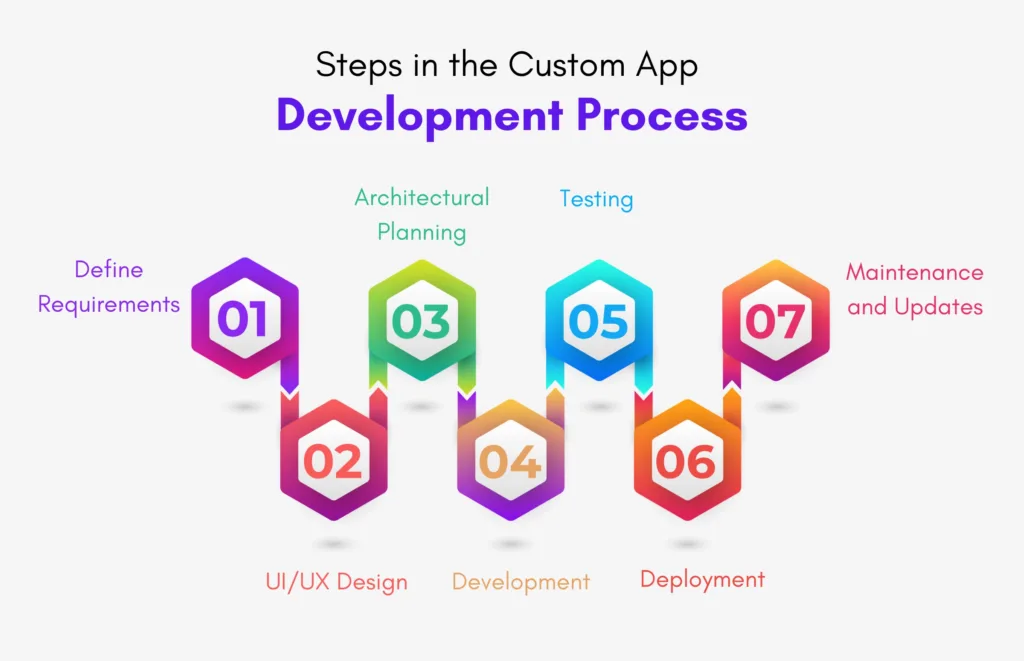
1. Discovery & Ideation
Everything starts with understanding your vision:
-
What’s the problem you’re solving?
-
Who is your target audience?
-
What makes your app different?
Deliverables: Problem statement, business goals, and a value proposition.
2. Planning & Requirements Gathering
Next, define what your app should do:
-
Functional requirements (e.g., login, dashboard, payments)
-
Non-functional requirements (e.g., performance, security)
Create a Product Requirements Document (PRD) to guide your developers.
3. UI/UX Design
Good design isn’t just pretty—it’s functional.
-
Wireframes: Skeleton layout of your app
-
Mockups: Visual designs with branding
-
Prototypes: Interactive demos to test user flows
Don’t skip this! Great design improves user engagement and retention.
4. Development Phase
Here’s where coding begins. Choose your approach:
-
Native Development: Swift (iOS), Kotlin (Android) – Best performance
-
Hybrid Frameworks: Flutter, React Native – Faster development
-
Web Frameworks: Angular, Vue, or Laravel – Browser-based apps
Break development into sprints and use Agile methodology for flexibility.
5. Testing & QA
Testing should run alongside development:
-
Unit Testing: Tests individual components
-
Integration Testing: Ensures systems talk to each other
-
User Acceptance Testing (UAT): Real users validate usability
-
Security Testing: Ensures data safety
6. Deployment & Launch
You’re almost there! Launch involves:
-
Uploading to App Stores (with assets, privacy policies, etc.)
-
Setting up cloud hosting (e.g., AWS, Google Cloud)
-
Rolling out in stages (beta → full release)
7. Post-Launch Maintenance
Keep your app healthy:
-
Fix bugs
-
Monitor performance
-
Release updates
-
Add new features based on feedback
Custom vs Off-the-Shelf: A Side-by-Side Comparison
| Feature | Custom App | Off-the-Shelf App |
|---|---|---|
| Flexibility | High – Fully customizable | Low – Predefined functionality |
| Cost | Higher upfront, lower long-term | Lower upfront, recurring fees |
| Ownership | You own 100% | Limited (usually licensed) |
| Speed to Deploy | Slower (3–6+ months) | Faster (immediate) |
| Maintenance Control | Full control | Depends on vendor |
| Integration | Seamless with your stack | Limited to vendor APIs |
| Branding/UI | Fully custom | Generic |
Benefits at a Glance
Let’s recap the value of custom apps:
-
Tailored experience: Designed for your users
-
Competitive edge: Unique features and performance
-
Full control: Over data, UI, integrations
-
Scalable: Grows with your business
-
Better ROI: Fewer limitations, more efficiency
Common Pitfalls to Avoid
Even with the right idea, the wrong execution can derail your app. Watch out for:
1. Scope Creep
Stick to MVP features first. Add enhancements later based on user feedback.
2. Neglecting UI/UX
Bad design = bad experience. Prioritize intuitive flows and clean visuals.
3. Skipping Testing
Launching without QA is risky. Bugs, crashes, and unhappy users are expensive mistakes.
4. No Feedback Loop
Post-launch analytics and user feedback are crucial for ongoing success.
FAQs: Custom App Development
Q1: How much does custom app development cost?
It varies. Simple apps might cost $5,000–$15,000. Complex platforms can go beyond $100,000 depending on features and integrations.
Q2: Do I need to hire a developer or a full agency?
That depends. Freelancers are cheaper but may lack end-to-end support. Agencies provide design, development, QA, and project management.
Q3: How long does the process take?
A basic MVP might take 3–4 months. A full-featured enterprise app may take 6–12 months.
Q4: Can I update my custom app later?
Yes! Custom apps are built for flexibility—updates, scaling, and enhancements are easier and cost-effective.
Q5: What’s the difference between native and hybrid apps?
Native apps are faster and smoother but more expensive. Hybrid apps are cheaper and faster to develop, but might not offer top performance.
Q6: Can I monetize a custom app?
Absolutely. You can monetize via ads, subscriptions, in-app purchases, or direct sales.
Is Custom App Development Worth It?
If your business needs flexibility, scalability, and unique features, then investing in custom app development is a no-brainer. While it may demand more time and resources upfront, the long-term control, cost efficiency, and strategic advantage are unbeatable.
Ready to bring your idea to life?
Check out our Custom Web Development services at NanoCodes.
We build SEO-optimized, responsive, and scalable web platforms tailored to your goals.