


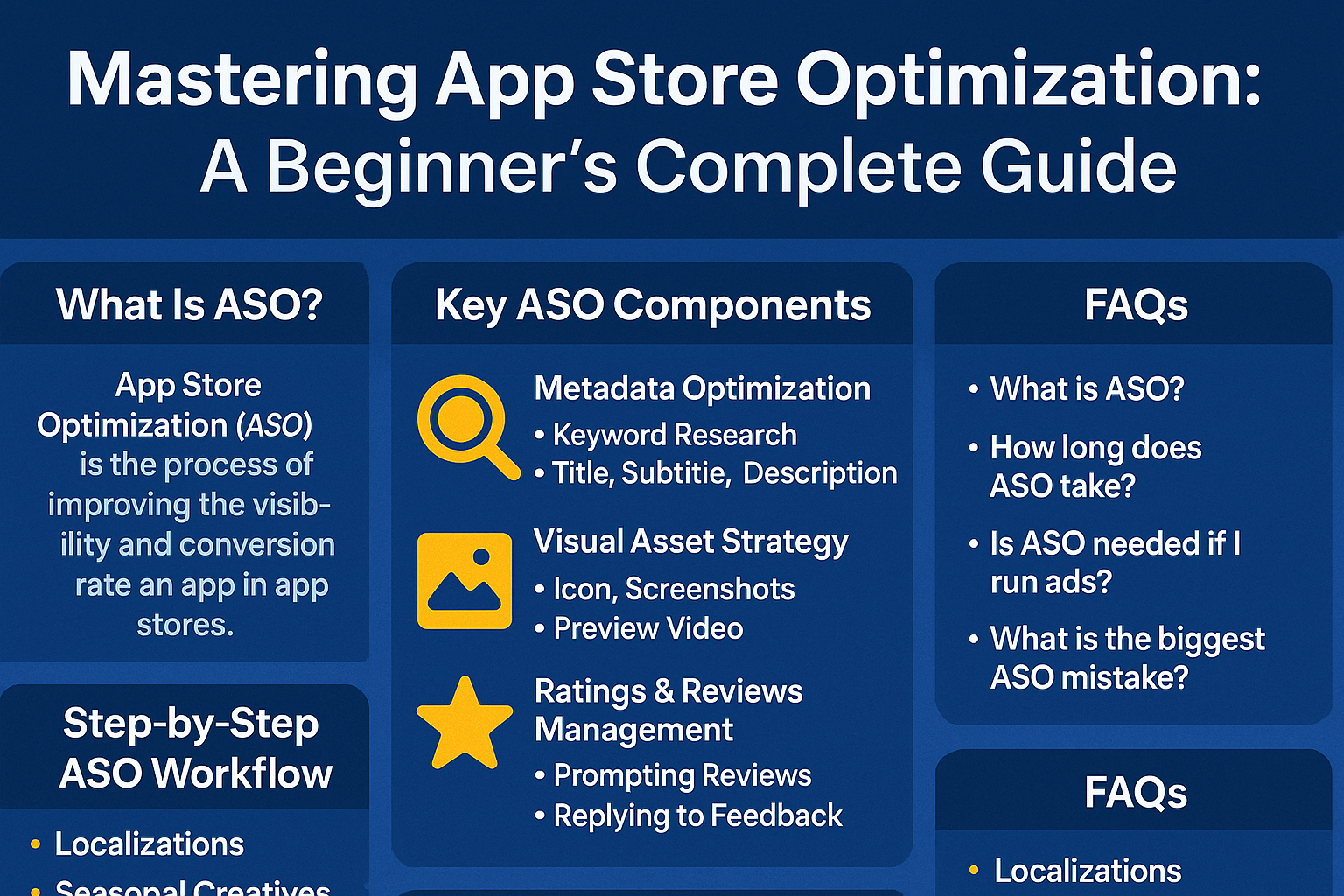
What Is App Store Optimization?
App Store Optimization (ASO) is all about making your app easier to find in app stores and more likely to be downloaded once people see it. Think of it as SEO for mobile apps. This includes:
-
Metadata optimization: Crafting keywords in your title, subtitle, and description
-
Visual strategies: Designing an eye‑catching icon, screenshots, videos, and banners
-
Social proof & engagement: Encouraging ratings, reviews, and in‑app events
ASO started with basic keyword stuffing in titles but has evolved into a holistic marketing process that covers visibility, conversion, and user signals like engagement and retention.
Why App Store Optimization Is Crucial for App Success
Let’s break down why ASO is non‑negotiable, especially for beginners and small developers:
Boosts Organic Visibility
ASO improves discoverability by surfacing your app for relevant searches. With over 5 million apps in stores, ranking is key
Increases Conversion Rates
Once people land on your app page, effective icons, visuals, and descriptions dramatically affect download decisions
Saves on Marketing Budget
Compare ASO to paid acquisition: once set up, ASO delivers cost‑efficient results that scale sustainably
Supports Paid Campaigns
Strong ASO enhances the ROI of Apple Ads or Google UAC because a polished store page converts better
Key ASO Components: A Beginner’s Toolbox
To succeed in App Store Optimization (ASO), you need to understand the three major building blocks:
-
Optimizing the text (metadata) people search for
-
Designing attractive visual assets that convert visitors into downloads
-
Managing user feedback through ratings and reviews
Metadata Optimization: Choosing the Right Words
Metadata is the text-based content users see (and some they don’t) when they visit your app’s page. It includes your app’s title, subtitle, keywords, and description.
Keyword Research Tools
Before you write anything, use ASO tools like:
-
AppTweak
-
Sensor Tower
-
ASOdesk
These tools help you:
-
Discover the keywords people are actually searching for
-
Check how competitive those keywords are
-
Analyze what keywords your competitors use
Title, Subtitle, and Description Strategy
-
App Title (iOS/Google Play): This is the first thing users see. Include your brand name + a main keyword that describes your app’s function. E.g., “PhotoFix – AI Photo Enhancer”.
-
Subtitle (iOS only): This field supports 30 characters. It should describe your app’s main benefits and include a secondary keyword. E.g., “Enhance images in 1 tap”.
-
Description (especially important in Google Play):
-
Use this space to describe your app’s features in detail.
-
Use long-tail keywords naturally don’t just stuff them.
-
Add calls to action (CTAs) like “Try it free” or “Download now.”
-
Remember: Apple doesn’t index the description for keywords, but Google Play does so structure it wisely.
Visual Asset Strategy: Design That Sells
Even if users find your app, they won’t download it unless it looks trustworthy and appealing. That’s where visual assets come in.
Icon
-
Must be clear, professional, and recognizable
-
Avoid clutter and tiny text
-
Consistent with your app’s color scheme
Screenshots
-
The first 2–3 screenshots are the most important they often appear in search results.
-
Highlight your app’s best features and real use cases
-
Use short captions with benefit-driven text. For example: “Scan documents in 1 click!”
Preview Video
-
Short videos (15–30 seconds) help users understand how your app works
-
Focus on your core value in the first 10 seconds
-
Great for apps in categories like gaming, editing, or productivity
Ratings & Reviews Management: Build Trust
Apps with positive reviews and high star ratings rank better and get downloaded more often.
Here’s how to manage this as a beginner:
-
Prompt users to rate your app (especially after a positive experience)
-
Respond to every review, whether good or bad. Show you care.
-
Fix common issues mentioned in reviews to improve retention and your app’s rating
For example, if users complain about crashes, fix them and highlight this improvement in your app update notes.
iOS vs Google Play ASO: Key Differences
Both platforms have different rules, features, and ranking signals. What beginners should know:
iOS (Apple App Store)
-
Keyword Bank (100 characters): Apple lets you hide keywords from users in a special keyword field. Use it smartly separate each word with commas.
-
In-App Events & Custom Product Pages: Apple allows developers to create special landing pages for different audiences or promotions. These pages are indexed and can improve discovery.
Google Play (Android)
-
Full Description Indexing: Unlike Apple, Google reads your entire app description to decide how to rank it. Use keywords naturally.
-
A/B Testing Built-In: Google lets you test different versions of your icon, screenshots, and descriptions right in the developer console. This helps improve conversion rates over time.
Advanced ASO Tactics for Beginners
Once you’ve mastered the basics, take it up a notch with these strategies:
Localization
-
Translate your app’s metadata and screenshots into multiple languages.
-
Tailor the keywords to each country’s search habits not just literal translations.
-
Apps that localize typically see a 30–50% increase in downloads.
Seasonal Creatives
-
Update your visuals for holidays (e.g., a red theme for Valentine’s Day or snowy backgrounds for Christmas).
-
Adds freshness to your app and improves engagement.
In-App Events & Promotions
-
Highlight app updates, seasonal sales, or limited features using the App Store’s Event Card or Google Play’s LiveOps.
-
These updates get featured and are discoverable.
Apple Ads & Google UAC Synergy
-
Running paid ads? Make sure your app page is optimized.
-
ASO and ads work better together ads bring traffic, and ASO converts that traffic into downloads.
Step‑by‑Step ASO Workflow for Beginners
If you’re just starting out, it helps to follow a simple, repeatable ASO process. Beginner-friendly workflow to guide you:
Step 1: Market & Competitor Research
Before optimizing your app, you need to understand your audience and your competition.
-
Identify your target users: Who are they? What problems are they solving?
-
Search keywords in the App Store/Google Play: See which apps rank for your niche.
-
Analyze competitors: Use tools like AppTweak or AppRadar to study their titles, screenshots, keywords, and reviews.
Step 2: Perform Keyword Research
Now that you know your space, find the best keywords for your app.
Use ASO tools like:
-
AppTweak
-
ASOdesk
-
Sensor Tower
Look for:
-
High search volume, low competition keywords
-
Long-tail phrases (e.g., “free calorie counter” instead of just “calories”)
Step 3: Optimize Metadata and Visuals
This is where your keyword research pays off.
For iOS (Apple App Store):
-
Place your main keyword in the title
-
Use the 100-character keyword field
-
Design attractive screenshots and app icon
For Google Play:
-
Optimize the long description with keywords
-
Write a keyword-rich short description
-
Use A/B testing for visuals
Step 4: Publish and Track
Once you update your metadata and assets, you need to track your performance.
Monitor:
-
App Store Ranking for your chosen keywords
-
Conversion Rates (from views to installs)
-
Retention Rates (how long users stay)
-
Rating & Reviews
Use analytics and ASO tools like:
-
AppTweak: Keyword performance, ranking, suggestions
-
Sensor Tower: Competitive benchmarks
-
AppRadar: Conversion tracking and updates
Step 5: Iterate Monthly
ASO is not a one-time fix it’s an ongoing process. Every few weeks:
-
Test new keywords
-
Update screenshots with new features
-
Track performance dips or spikes
-
Read reviews to understand user concerns
Frequently Asked Questions (FAQs)
1. What is App Store Optimization in simple words?
App Store Optimization (ASO) is like SEO for mobile apps. It helps your app appear higher in search results and get more downloads without spending on ads.
2. What’s the difference between ASO and SEO?
SEO is for websites and Google search. ASO is for mobile app stores (Apple App Store and Google Play) and focuses on app visibility and conversions.
3. How long does it take for ASO to show results?
Usually 2–4 weeks. It depends on your competition, your app category, and how well you optimize your metadata and visuals.
4. Do I need ASO if I’m running ads?
Yes! Ads bring traffic, but if your app page isn’t optimized, people won’t download. ASO increases conversion and lowers your ad costs over time.
5. Can I do ASO without paid tools?
Yes, but it’s harder. Free tools exist, but premium platforms like AppTweak or ASOdesk give better keyword insights and tracking.
6. What’s the biggest ASO mistake beginners make?
Focusing only on keywords. Visuals, reviews, and user experience matter just as much as keyword placement.
Conclusion & Next Steps
App Store Optimization is one of the most cost-effective ways to grow your app’s visibility and user base. For beginners, it might seem overwhelming—but by breaking it down into:
-
Smart keyword research
-
Eye-catching visuals
-
Active review management
-
Regular testing and updates
—you’ll be able to turn a good app into a top-ranking app.
Try one of the beginner-friendly ASO tools like AppRadar or ASOdesk. Audit your current app store page, apply simple improvements, and measure the impact in a few weeks.